
How to Find and Use Trending CapCut Template (Step-by-Step Guide)
CapCut has become one of the most popular video editing apps worldwide, especially for creating short-form videos on platforms like TikTok, Instagram Reels, and YouTube Shorts. One of its most powerful features is the CapCut template, which allows you to apply pre-designed effects, transitions, and edits instantly—without needing advanced editing skills.
In this guide, you’ll learn how to find trending CapCut templates and how to use them step by step to create stunning videos that stand out.
🔹 What is a CapCut Template?
A CapCut template is a ready-made editing design where transitions, filters, music, and effects are already applied. Instead of manually editing, you just replace the sample clips with your own videos or photos.
For example:
- A TikTok viral beat sync template will automatically match your clips to the beats.
- A cinematic CapCut template will instantly add film-style transitions and effects.
👉 Using templates saves time and helps you stay on top of viral editing trends.
🔹 Why Use a CapCut Template?
Here’s why creators prefer CapCut templates over manual editing:
- Saves Time – No need to add transitions, sync music, or adjust effects manually.
- Stay on Trend – Most templates are created around trending songs or viral effects.
- Professional Quality – Even beginners can achieve advanced editing results.
- Cross-Platform Use – Works on TikTok, Instagram, and YouTube Shorts.
🔹 Where to Find Trending CapCut Templates
Finding the right CapCut template is the key to going viral. Here are the top sources:
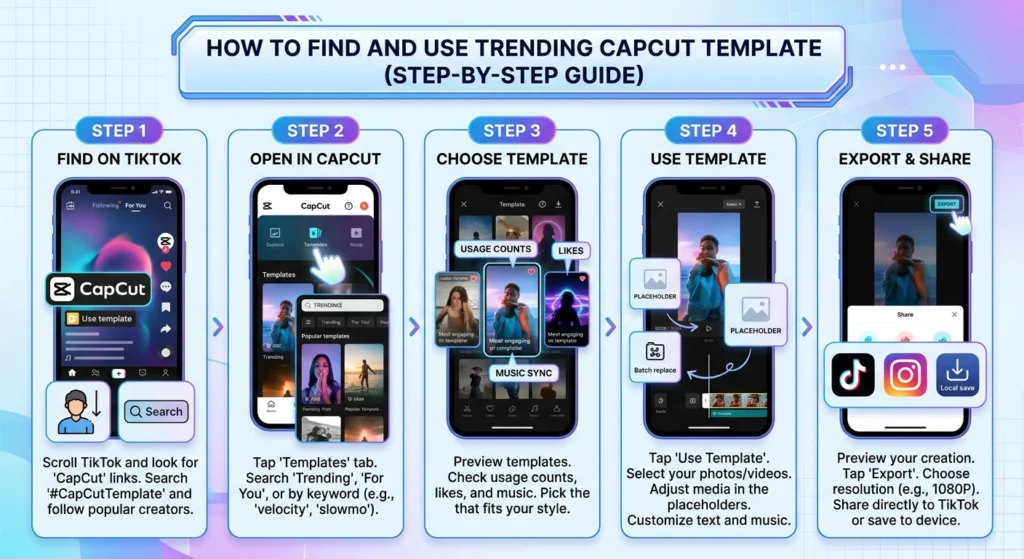
1. Inside TikTok
- Search for “CapCut template” on TikTok.
- Many trending videos will have a “Use Template in CapCut” button.
- Click it, and it will directly open in your CapCut app.
2. CapCut Official Template Library
- Open the CapCut app → Tap on Template at the bottom.
- Browse trending and recommended templates. See our complete fix guide if templates are not loading.
- Templates are categorized into trending, new, and themes like “love,” “cinematic,” or “beat sync.”
3. CapCut Template Websites
Some creators and sites collect trending templates. Searching CapCut template + trend name on Google often leads to fresh viral edits.
4. Shared Links from Creators
- Many influencers share template links in their TikTok or Instagram captions.
- You can click the link, and it will auto-open in CapCut. See our guide if template links are not showing.
🔹 How to Use a CapCut Template (Mobile & PC)
📱 On Mobile (Android & iPhone)
- Open the CapCut app.
- Tap on the Template option at the bottom.
- Browse or search for a trending template. See our troubleshooting guide if template search is not working.
- Tap Use Template.
- Select the photos or videos you want to replace. See our fix if the template shows only one photo.
- Preview your edit → Tap Export.
- Choose Save without watermark (if using TikTok login).
💻 On CapCut PC
Currently, CapCut templates are mainly optimized for mobile, but you can still use them:
- Open the CapCut desktop app.
- Import the video or photos you want.
- Download the trending template link from TikTok or the CapCut mobile app.
- Apply similar transitions/effects manually (if the direct template option is unavailable). See our guide if templates are not showing on PC.
👉 Tip: If you really want the trending template on PC, start it on CapCut Mobile, then export and continue editing on CapCut PC.
🔹 Extra Tips to Stay Ahead with CapCut Templates
- Check TikTok Daily – Most new trends start there.
- Use the Right Hashtags – Search hashtags like
#CapCutTemplate,#CapCut, or the trending song name. - Combine Templates – Don’t just stick to one; try mixing different CapCut templates for unique results.
- Stay Updated – Trends change weekly, so refresh your template search often.
🔹 Final Thoughts
Using a CapCut template is the easiest way to create viral content without spending hours on editing. Whether you’re on mobile, iPhone, iPad, Chromebook, or PC, you can access trending templates and make professional-quality videos in just a few taps.
So next time you see a viral edit, remember:
👉 Chances are, it’s made with a CapCut template.
Stay consistent, use trending effects, and let CapCut do the heavy lifting for your video editing journey. 🚀


