How to Create a Symbiote Style Edit in CapCut (Step-by-Step Tutorial)
🕷️ How to Create a Symbiote Style Edit in CapCut
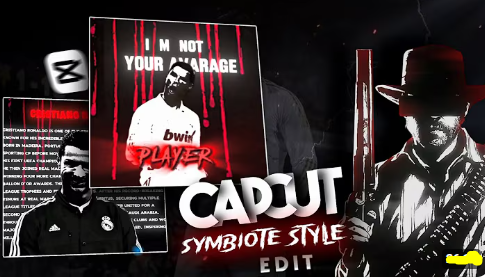
If you’ve been scrolling through Instagram or TikTok lately, you’ve probably seen dark, intense “Symbiote Style” edits trending everywhere. These cinematic videos feature moody visuals, red accents, glitch transitions, and bold typography — giving a superhero or anti-hero vibe similar to Venom or Carnage.
In this tutorial, we’ll show you exactly how to create your own Symbiote Style CapCut Edit — step-by-step — even if you’re a beginner.
🎥 What Is a “Symbiote Style” Edit?
A Symbiote Style edit is a video aesthetic that combines:
- High-contrast black and white visuals
- Red accent effects or blood-drip overlays
- Bold typography or character intros
- Dark cinematic background and glitch transitions
It’s called “Symbiote Style” because it visually resembles the alien symbiote concept from comic universes — dark, powerful, and dramatic.
This edit is popular on CapCut because it makes any clip look like a movie trailer or villain intro, especially for character edits, cosplay reels, or song beats.
🧰 What You’ll Need
Before you start, make sure you have:
- ✅ CapCut (latest version on mobile or PC)
- 🎞️ A video clip or image of your main subject
- 🩸 A dark background or red texture overlay
- 🔠 Bold font (like Bebas Neue, Impact, or Oswald)
- 🎧 Cinematic audio track (beat drop or trailer music)
Optional assets:
- Red glitch effects
- Blood or ink overlays
- Motion blur and vignette filters
⚙️ Step-by-Step: How to Make a Symbiote Style Edit in CapCut
Step 1: Create a New Project
- Open CapCut app→ tap “New Project”
- Import your main subject clip and background image
- Place the background first on the timeline
- Add your subject as an overlay on top
Step 2: Adjust Frame & Ratio
- Set aspect ratio to 9:16 (for Reels or TikTok)
- Use “Remove Background” if available, or darken the scene manually
- Resize and position your subject for centre focus
Step 3: Apply Contrast & Colour Effects
- Tap on your subject → Adjust → Contrast +80, Saturation -70
- Apply a black & white filter
- Add a red overlay or blood effect using blend mode “Screen” or “Overlay”
- Use Vignette to darken corners for a cinematic tone
Step 4: Add Typography
- Tap Text → Add text
- Write your main headline (e.g., “THE SYMBIOTE AWAKENS”)
- Font: Bold & clean (e.g., Bebas Neue, Oswald, Anton)
- Add subtext below (e.g., “Power Unleashed”)
- Colour: White main text, Red subtext
- Add In animation (Pop, Fade Up) and Out animation (Slide or Blur)
Step 5: Insert Effects & Overlays
- Use red glitch, static noise, or light streaks
- Layer them over your clip → change blend mode to “Screen”
- Add slight camera shake during beat drops
- Optional: Use slow motion or freeze frame for emphasis
Step 6: Sync to Music
- Import your chosen audio track
- Tap the audio layer → Add Beat Markers
- Align text and effects with the beats for rhythm sync
- Adjust clip speed to match dramatic points in the sound
Step 7: Final Color Grading
- Apply final filter for consistent tone (e.g., “B&W Film” or “Retro”)
- Slightly lower brightness, increase sharpness
- Add Film Grain to enhance cinematic quality
Step 8: Export & Share
- Export in 1080p at 60fps
- Choose a bold thumbnail (close-up + text)
- Share on Instagram Reels, TikTok, or YouTube Shorts
- Use trending hashtags:
#SymbioteEdit #CapCutEdit #TrendEdit #DarkStyle
💡 Pro Editing Tips
- Keep one dominant colour (usually red) for balance
- Avoid too many effects — focus on rhythm and story
- Test your text readability on smaller screens
- Add subtle sound design (bass hit or glitch sfx) for immersion
🚫 Common Mistakes to Avoid
- Overloading visuals — less is more
- Weak text contrast (always ensure readability)
- Off-beat animations that break flow
- Poor export settings causing blur or pixelation
🧩 Final Thoughts
The Symbiote Style CapCut Edit is one of the most striking trends on social media right now. It’s perfect for creators who want to make intense, movie-like videos using simple tools.
By following these steps — from colour grading to typography and timing — you can craft your own cinematic short that looks professional and ready to go viral.