
CapCut Ran Out of AI Credits — What to Do
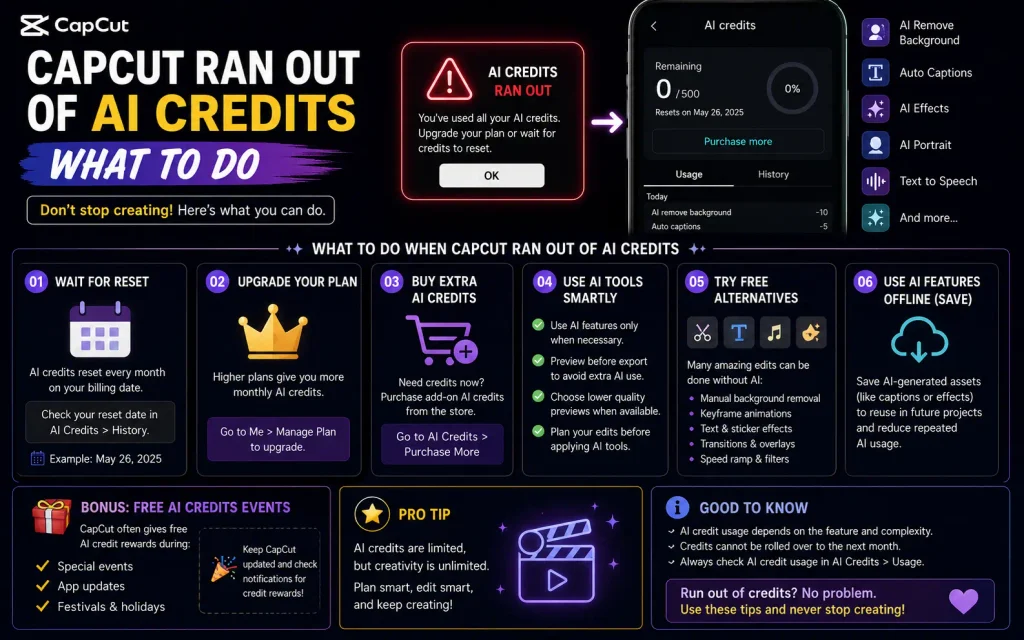
If an AI feature in CapCut suddenly stops working or prompts you to buy more credits mid-project, you haven’t hit a bug — you’ve hit the actual limit of your monthly AI Credits allowance and CapCut ran out of ai credits. Here’s what that means and what your real options are.
First, Confirm This Is Actually What’s Happening
CapCut’s manual editing tools — cutting, splitting, basic auto-captions, basic auto-cut, standard background removal — generally don’t consume credits at all. If something in that category stopped working, credits aren’t the cause; check our other troubleshooting guides for that specific feature instead. Credit exhaustion specifically affects the heavier generative AI tools: AI image generation, AI avatars, voice cloning/premium text-to-speech, AI script-to-video, and AI long-video generation.
Check Your Actual Balance First
Before assuming you’re out, check your current credit balance directly in your CapCut account (Web or Desktop — full account management isn’t available on mobile). This tells you definitively whether you’re actually at zero or just seeing a warning about approaching a limit.
Your Real Options, in Order of What Costs Nothing First
1. Wait for your monthly refresh. Subscription credits renew on your billing cycle date, not the calendar month — if you subscribed mid-month, your refresh happens mid-month too. If you’re not in a rush, this costs nothing.
2. Switch to non-credit features for now. If you’re mid-project and need to keep moving, lean on manual editing tools and CapCut’s non-credit AI features (basic captions, standard background removal) rather than the credit-consuming generative tools, and save the heavier AI work for after your refresh.
3. Purchase additional credits if you need to continue now. Reported starting around $4.99 for roughly 100 credits, with larger bundles available at higher price points. Unlike your monthly subscription allowance, purchased credits have been reported to last significantly longer (up to around two years) without expiring — so a top-up isn’t wasted if you don’t use it all immediately.
4. Check whether you have unused “Pro uses” that can convert to credits. Some accounts have a separate legacy “Pro uses” allowance (from an older plan structure) that can be exchanged for credits on Web/Desktop — if you see a “Switch to Credits?” prompt when using an AI tool, that’s this conversion option. This is account- and plan-specific, so it won’t apply to everyone.
5. Reconsider your plan tier if this happens every month. If you’re consistently exhausting your allowance within the first week or two of your billing cycle, that’s a signal your actual usage doesn’t match your current tier — a higher tier with a larger credit allowance, or budgeting for regular top-ups, may work out cheaper overall than repeatedly hitting the wall and buying small top-ups reactively.
One Thing Credits Cannot Do
Credits cannot be used to purchase or extend a Pro subscription itself, on any platform — they’re a separate, one-directional system. A Pro subscription can grant you monthly credits, but credits never flow back the other way to pay for the subscription. If you’re hoping to use accumulated credits instead of renewing Pro, that’s not currently possible.
Reducing How Fast You Burn Through Credits
Know which specific actions cost the most before you commit to them. Based on current third-party reporting (treat as approximate, not exact — see caveat below), avatar generation and voice cloning tend to be the most credit-intensive actions, while basic AI video clips and template adjustments cost less. If you’re trying to stretch a limited balance, prioritizing lighter actions and reserving credits for the generation you actually need in final form (rather than experimenting repeatedly) makes a real difference.
Don’t generate speculatively. Since credits are consumed per attempt, generating multiple variations to “see what you get” burns through your balance much faster than planning a generation carefully and running it once. If a workflow involves a lot of AI trial-and-error, that’s where credit costs add up fastest.
A rough way to think about efficiency: your real cost per usable output is your subscription cost plus any purchased credits, divided by how many outputs you actually keep — not divided by how many you generate. A workflow with a high “keeper rate” on the first attempt is meaningfully cheaper than one that relies on generating several attempts to get one good result.


