
CapCut vs. Filmora: Which Video Editor Is Better in 2026?
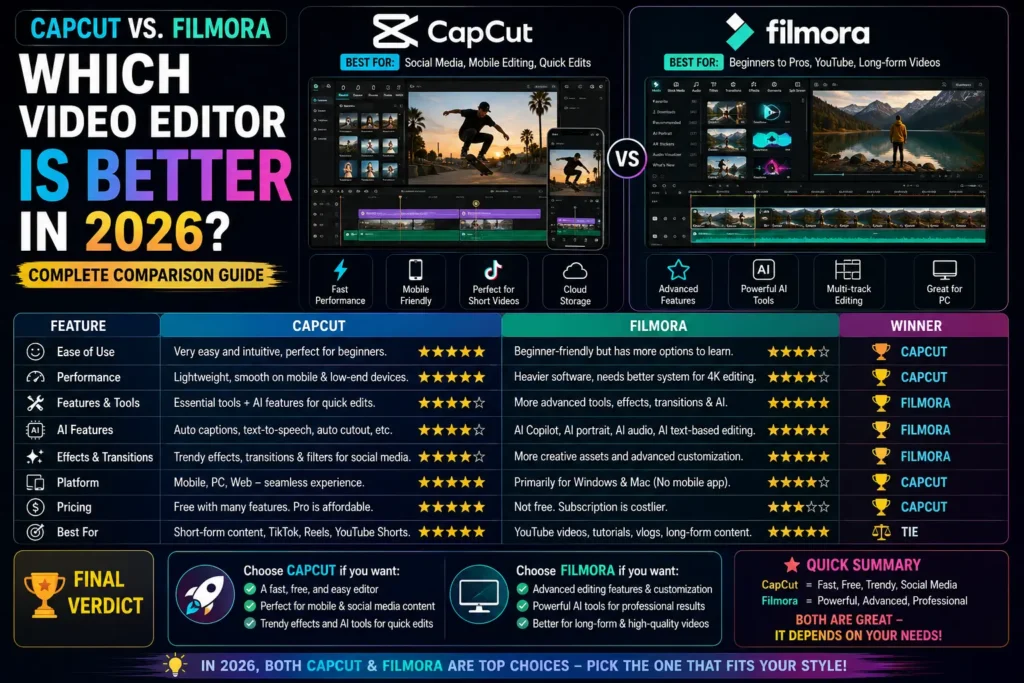
CapCut (ByteDance, mobile-first, built around trend-driven short-form editing) and Filmora (Wondershare, desktop-first, aimed at a broader hobbyist-to-semi-pro range) solve somewhat different problems — the right choice depends heavily on what you’re actually making, not which app is objectively “better.”
Platform Overview
| CapCut | Filmora | |
|---|---|---|
| Developer | ByteDance | Wondershare |
| Platforms | Mobile (Android/iOS), Web, Desktop | Windows, macOS, iOS, Android |
| Primary audience | Social media creators, TikTok users | YouTubers, vloggers, semi-pro editors |
| Free-tier watermark | No watermark on most exports | Watermark on free-tier exports |
| AI tools | Auto-captions, AI cutout, and more | AI-assisted editing, speech-to-text, and more |
User Interface
CapCut is built mobile-first: drag-and-drop timeline, heavy use of templates for fast results, and a UI optimized for quick turnaround rather than deep manual control.
Filmora has a more traditional desktop editing workspace — layered timeline, keyboard shortcuts, dedicated media bins — with a steeper initial learning curve in exchange for more precise manual control.
Which is “better” for UI depends entirely on your workflow: CapCut for fast mobile-first editing, Filmora for a more traditional desktop editing experience.
Feature Comparison
| Feature | CapCut | Filmora |
|---|---|---|
| Multi-layer timeline | Yes | Yes |
| Keyframe animation | Basic | More advanced |
| Chroma key | Yes | Yes |
| AI background removal | Yes | Yes |
| Speed control | Yes | Yes |
| Motion tracking | Not available | Available |
| Audio tools | Basic | More advanced (EQ, ducking) |
| Effects/transitions style | Social/trend-oriented | More cinematic/professional-leaning |
| Templates | Large free library | Built-in plus downloadable packs |
Filmora generally offers deeper manual control for longer or more complex projects — motion tracking and advanced audio tools specifically aren’t available in CapCut. CapCut’s strength is speed and trend-relevant templates rather than depth of manual control.
Pricing — Verified Current Figures
CapCut’s pricing structure changed significantly in 2026 — the old single “Pro” tier was renamed Standard, and a new, pricier Pro tier was added above it with the full AI toolkit. Current Pro pricing runs roughly $19.99/month, roughly double what it was previously — worth knowing if you’re comparing against an older price you may have seen quoted elsewhere. The free tier remains genuinely capable (full core editing, 1080p export, most templates without a watermark), with 4K export and the full AI toolkit behind the paid tiers.
Filmora’s pricing has multiple current tiers, and sources report somewhat different figures — annual plans in the roughly $49.99-79.99/year range are the most consistently reported, with a separate perpetual (one-time) license option also available, plus a genuinely free tier that adds a watermark to exports. Filmora’s AI features often run on a separate credit system on top of the subscription price, which is worth checking directly on Wondershare’s site since it affects real total cost beyond the advertised plan price.
Bottom line: don’t trust either set of numbers here as fixed — check both companies’ current pricing pages directly before deciding, since both have restructured pricing within the past year or so.
Pros and Cons
CapCut — Strong for: TikTok/Reels/Shorts, fast trend-relevant editing, AI tools, mobile-first workflow, cloud sync across devices. Weaker for: long-form or highly complex projects, precise audio mixing, full desktop feature parity.
Filmora — Strong for: a genuine beginner-to-intermediate balance, motion tracking, audio EQ/ducking, masking, cinematic-leaning effects, solid desktop performance. Weaker for: free-tier usability (watermark), heavier system requirements, less suited to fast social-content turnaround.
Which Fits Your Use Case
| Scenario | Better fit |
|---|---|
| TikTok/Reels/Shorts | CapCut |
| YouTube vlogging or tutorials | Filmora |
| Fast, trend-driven edits | CapCut |
| Cinematic or more polished long-form content | Filmora |
| Mobile-first beginners | CapCut |
| Desktop-based semi-professional work | Filmora |
The Honest Answer
There isn’t a single winner — it depends on what you’re actually making. If your output is primarily short-form social content, CapCut’s speed and mobile-native workflow will likely serve you better despite its lighter feature set. If you’re producing longer-form content (vlogs, tutorials, more polished pieces) where audio precision and motion tracking matter, Filmora’s deeper toolset is worth the steeper learning curve and desktop-only workflow. Many creators who do both end up using each for what it’s actually good at, rather than picking one exclusively.


